Using hledger together with Excel

Hi,

I use hledger, but only for general ledger operations such as balance checks, reporting, and validation.

The entire ledger also lives in Excel worksheets. Excel is where I review, edit, and reclassify everything.

Typical workflow:

  • Excel = full, editable ledger (worksheets)

  • VBA = transforms Excel data into hledger journal format; parses portfolio transactions so I can apply FIFO and calculate investment returns; exports CSVs for other tools

  • hledger = verification and reporting engine

I frequently revisit thousands of past entries, mainly to apply bulk changes to investment transactions. This is not something I can do directly inside hledger journals (Because i don’t know how and ledger is like a “master record” for hledger import pipeline).

Because of this, I don’t use hledger import as a one-way pipeline. I selectively parse data, send data to hledger, inspect the results, then continue working in Excel.

That said, I could abandon Excel if I had equivalent parsing and transformation capabilities: a CSV-based master record, rule-driven imports, and the ability to repeatedly regenerate journals from source data without manual fixes. As it stands, once manual edits are required, that model breaks down.

I’m looking for others using a similar split model.
If you use hledger as a helper rather than the primary workspace, I’d like to compare workflows.

1 Like

I am wondering how you can represent a ledger with multiple postings in a transaction in Excel? I have done some experimenting along these lines.

I have used extra columns to do more than two postings in one row. It has worked ok (rarely ever would I have more than 5 postings), but it would be nice to have N postings in a transaction.

I’ve looked at splitting a transaction across multiple rows, but I’ve hit problems with how to do that without columns identifying row type and a transaction id keeping transactions together. It seems more prone to data corruption than the 1 row per transaction.

Could you share your spreadsheet layout? I’d love to see a more elegant solution.

1 Like

That's a cool setup, thanks for describing it.

You probably know that you could export the sheet as CSV and make some hledger CSV rules to run reports against that. But probably your VBA converter is easier/more capable.

I am guessing your excel rows are a less expressive, more constrained, perhaps higher level representation of transactions than journal format ?

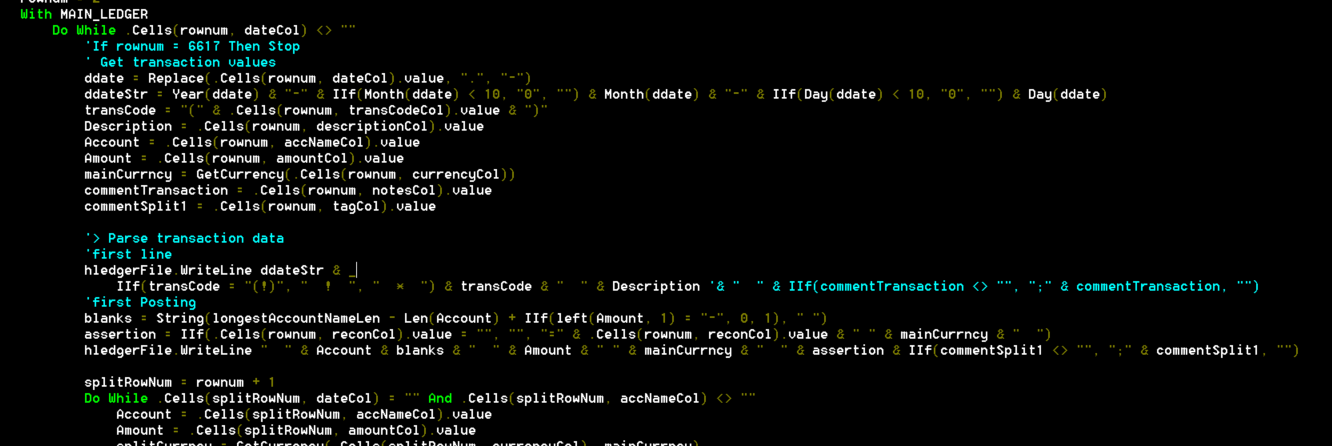
I can’t figure out how to explain the layout so i added a picture of it :slight_smile:
My approach is this:

Everything is handled VBA and then parsed into hledger format. Excel is the source of truth; the journal file is a derived output. Actually journal file is also the truth but it can change over time.

Investment transactions (buy / sell / dividend / split / interest) are created by VBA and stored in a separate dictionary object when parsing. The reason is: after the entire sheet has been scanned, I can apply FIFO logic for buy/sell operations, and generate the appropriate records for stock splits based on those stored instructions. In other words, after transactions are finalized line-by-line there is a rule-based process at the end.

Yes, there is a lot of string manipulation involved. This is definitely not a professional or “enterprise-grade” solution, and I’m not a programmer sadly.

What I ended up with is this:
Excel is the primary ledger for shaping the hledger journal ledger. I handle a high volume of transactions and can only enter them monthly, and in that situation working with a visual table is much more practical for me.

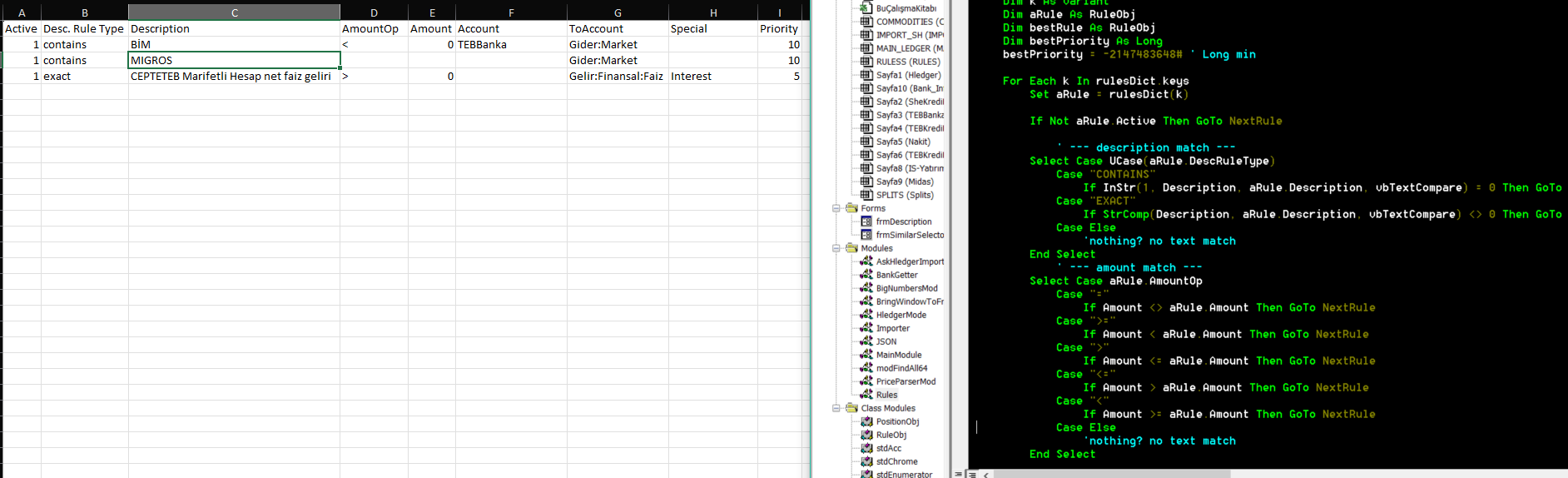
here is a screenshot from my code:

and of course i can share the code, after i cleanse personal information.

1 Like

You’re right, CSV + hledger rules are a very powerful approach, and I did consider that path. hledger’s rules system is impressive and works great for many use cases.

In my case, for investment activity (buys, sells, dividends, splits, interest), I need some post-processing that depends on the full dataset being known first. Things like FIFO matching and split adjustments across multiple transactions. I couldn’t find a clean way to express that kind of logic purely in a CSV rules file.

So Excel acts as a constrained input layer, and the VBA step expands that into proper journal entries once everything has been scanned. It’s more of a pragmatic workaround.
Ultimately, this setup helped me reduce friction in data entry while still automating the necessary post-processing logic.

1 Like

The rules system is still a work in progress. As shown in the screenshot, I currently filter on description and amount and derive two outputs (toAccount and special). It’s a more constrained model by design.

Thanks for sharing more about your spreadsheet and workflow. It clears up a lot of my confusion.

I now understand that your Excel ledger uses multiple rows to hold the information in a multiple line hledger plain text transaction. Posting information has its own columns.

I agree that it is difficult to track lot info in hledger and then do FIFO analysis. I’m not sure what the best workaround is.

As far as using the CSV import functionality in hledger, it is strictly one csv line generates one transaction. Simon did discuss it in another thread where he said that was a design decision to avoid making it too complex.

I think Simon uses the Emacs text editor to manipulate his journal files. Emacs is programmable in LISP much as Excel is programmable in VBA.

I was wrong; the sheet looks just as expressive as journal format, or more so. Your screenshot is super clear, thanks! I didn't quite understand the "Amount Checks are making from hledger" comment, only.

Of course excel is a much better UI for certain tasks. And here you're also making use of its programmability, adding additional layers of calculation/logic (FIFO cost basis/gains/tax calculation). This is an impressive setup, congrats!

The Excel sheet phobo3s uses is actually structured quite similar to the CSV output produced by hledger’s print command.

I wonder how difficult it would be to extend CSV-rules driven import to bring in the CSV produced by the print command, restoring multiple postings into a single transaction?

Thanks for the thoughtful response — yes, that’s exactly how it works.

For me, the best workaround so far for FIFO is to scan the entire ledger first, then apply matching and post-processing logic in a second step, and finally enter additional adjusted journal entries. In principle this could also be done by consuming hledger CSV output, and using a script.

Regarding CSV import: the main reason I can’t use hledger’s CSV importer is that I want an intermediate, editable ledger where I can see the parsed rows, review them, and make manual corrections before anything is finalized. Since I don’t use a highly programmable text editor like Emacs, and I already spend most of my unending working hours in front of Excel, this ended up being the most practical environment for me.

So yes, I’m essentially leaning on Excel + VBA as a programmable front-end, central data hub. At the moment I’m also experimenting with the reverse direction — pulling reports from hledger back into Excel and using them for charts and further analysis.

The main downside of this approach is distribution. Since it’s embedded inside an Excel file and VBA isn’t a standalone scripting language like Python, development and usage realistically don’t scale beyond a personal setup. That’s a sad trade-off.

Thanks a lot — I really appreciate that. And thanks for the kind words.

The “amount checks are made from hledger” comment just means that after generating the journal, I run hledger itself to validate totals and balances, and I treat hledger as the final authority for correctness rather than Excel.

Longer term, I’d like to evolve this into something that’s easier to distribute and reuse beyond a single personal setup. For now it’s very much shaped by my constraints and habits. In that sense, the real magic is in hledger itself — I’m just building a thin, opinionated layer around it to fit my workflow.

1 Like

In practice, restoring multi-posting transactions is trickier than it might look at first glance. You need ordering guarantees, grouping rules, and some notion of state across rows, and once those enter the picture, things become fairly error-prone.

My understanding — and Simonmic will obviously know better — is that hledger intentionally avoids pushing import rules to the point where they turn into a full scripting language. At that level of complexity, you inevitably end up needing a real scripting anyway.

That’s essentially the gap I’m filling with my Excel+VBA setup: a scripting layer that can get the data form source (yes it can download my bank data), see the full dataset, keep state (for commodity transactions), and enter correct journal entries afterward, while leaving hledger itself focused on being the authoritative accounting engine.

I am quite impressed by your VBA accomplishments, and so was Simon when he added you to his featured advanced workflows on hledger.org. Also, I get that your spreadsheet is much more than editing text in cells - the FIFO calculation is powerful.

I accept Simon should avoid making CSV import more complex. I am only suggesting that he allow multiline import for the format he created to output CSV data with hledger’s print command.

$ hledger print -Ocsv

"txnidx","date","date2","status","code","description","comment","account","amount","commodity","credit","debit","posting-status","posting-comment"
"1","2008/01/01","","","","income","","assets:bank:checking","1","$","","1","",""
"1","2008/01/01","","","","income","","income:salary","-1","$","1","","",""
"2","2008/06/01","","","","gift","","assets:bank:checking","1","$","","1","",""
"2","2008/06/01","","","","gift","","income:gifts","-1","$","1","","",""
"3","2008/06/02","","","","save","","assets:bank:saving","1","$","","1","",""
"3","2008/06/02","","","","save","","assets:bank:checking","-1","$","1","","",""
"4","2008/06/03","","*","","eat & shop","","expenses:food","1","$","","1","",""
"4","2008/06/03","","*","","eat & shop","","expenses:supplies","1","$","","1","",""
"4","2008/06/03","","*","","eat & shop","","assets:cash","-2","$","2","","",""
"5","2008/12/31","","*","","pay off","","liabilities:debts","1","$","","1","",""
"5","2008/12/31","","*","","pay off","","assets:bank:checking","-1","$","1","","",""

Currently if you try to import this with hledger’s CSV import, you get a new journal transaction for every line in the CSV file. If hledger would conditionally suppress outputting the first line of the transaction to the journal file if the txnidx field is unchanged, multiline input could work.

This would allow Excel and Gsheet users to edit their journals in a spreadsheet and then turn it back into a journal without having to add VBA or Google Apps Script to their sheets. I find I tend to botch edits in a text editor.

Thanks for the kind words — and yes, Simon deserves all the credit here.
In fact, if you take the CSV produced by hledger print -O csv and, for consecutive rows with the same txnidx, blank out the repeated columns (date, description, etc.), you end up with something very close to the worksheet layout I’m using in Excel.

That observation actually gave me a nice idea. Today I added CSV import/export support to my Excel project. This lets me archive my ledger as CSV, and also directly import CSVs in a format like the one below into a worksheet, then continue working within my existing workflow:

Date;Transaction Code;Payee|Note;Notes;Commodity/Currency;Operation;Tag/Note;Full Account Name;Amount;Rate/Price;Reconciliation;Note;Bank Desc.
46005;!;BİM ;-640,5;CURRENCY::TRY;;;bla:bla:bla;-640,5;1;;;BİM Q233-TR
;;;;;;;expenses:market;640,5;1

As you can see, on the second row the first several columns are intentionally left empty. With a simple script, you could transform hledger’s CSV export into exactly this shape — and from there, it’s already something that Excel can work with very naturally. If you want to import from hledger you should merge two rows together.

Thanks for the update. Looks like your archive/backup to csv sounds like a good addition to your workflow.

I did try csv import of an exported csv file. With each line imported, I created a transaction with an actual account and a “clearing” account. It works nicely for income statements and balance sheets as the clearing account balance is 0. But, of course, if I use a “print” command to make a .journal file, I end up with twice as many transactions. It’s not ideal, but it is a work around.

I must admit I use the clearing account workaround when I import from banks because I’m basically too lazy to enter every transaction by hand.